
Introducing Bulk Import Transactions via Spreadsheet
Consolidate your financials in one place with CSV transaction import

Small business owners often find themselves managing multiple financial accounts—perhaps a business checking account, a separate credit card, and maybe even a payment platform like PayPal or Venmo.
When tax season arrives, you’re left piecing together transactions from all these sources, downloading statements from different websites, and painstakingly entering data into your bookkeeping system.
The reality? You’re spending valuable hours reconciling transactions across platforms when you could be focusing on what matters most—growing your business.
Introducing: Import transactions via CSV to your Found account
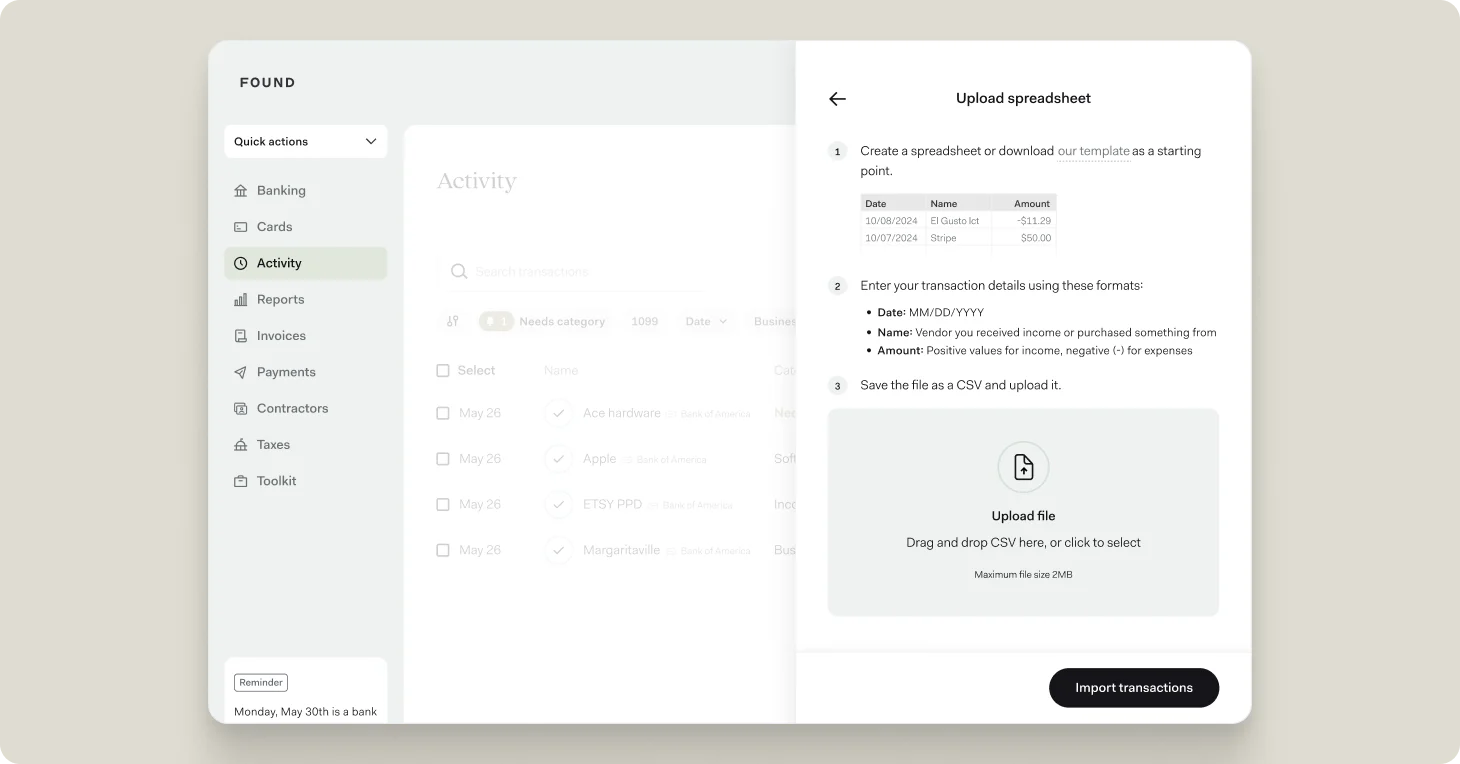
Now, with a few clicks and a single CSV file, it’s easy to import all your financial transactions from other accounts. You can upload transaction data from any financial tool you’re currently using, helping to keep your tax estimates and savings goals up to date automatically.
Managing a business often involves juggling finances across multiple accounts. Whether you’re tracking expenses in a spreadsheet, using another bookkeeping tool, or maintaining separate business accounts, bringing all your financial data into one place shouldn’t require hours of manual data entry.
Here’s how to import your transactions via CSV to Found:
- Create a spreadsheet or download our template as a starting point. Our template includes all the necessary fields formatted correctly.
- Enter your transaction details using these specific formats:
- Date: MM/DD/YYYY
- Name: Vendor you received income from or purchased something from
- Amount: Positive values for income, negative (-) for expenses
- Save the file as a CSV and upload it to Found. The maximum file size is 2MB.
The date, title, note, and amount columns included in your file will be imported into Found. You can add additional information to each transaction once they’ve been added to your Found account.
All Found customers, including users who are not subscribed to Found Plus or Found Pro¹, are able to import transactions by uploading CSVs (including ones created from Cash App or QuickBooks), as well as add bookkeeping records individually.
If you’re looking to take the manual work out of your bookkeeping, consider subscribing to Found Plus or Found Pro. Found Plus and Found Pro subscribers have the ability to import transactions from up to 10 linked accounts, streamlining your financial management even further.